Audit trail and certificate of completion
Every signing produces evidence to support your position if a signature is disputed: a tamper-evident event log, a sealed PDF and a bilingual certificate.
- Hash-chained audit events
- SHA-256Hash-chained audit events
- Seal embedded in the signed PDF
- PAdES-B-TSeal embedded in the signed PDF
- Third-party timestamp
- RFC 3161Third-party timestamp
- Bilingual certificate of completion
- AR + ENBilingual certificate of completion
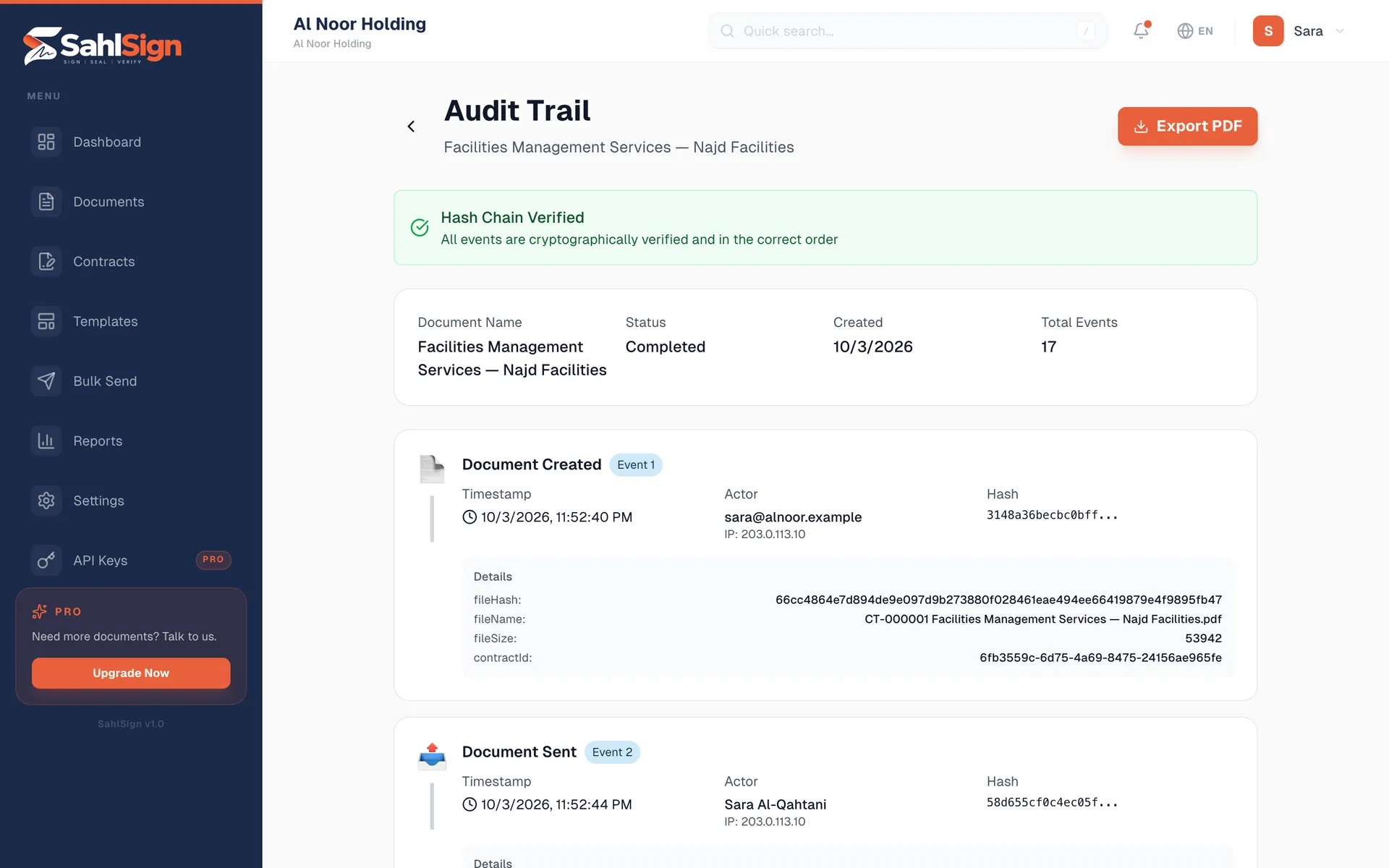
A record that shows if anyone changed it
Each event is hashed together with the one before it. Edit or delete any entry and every later hash stops matching.
The whole journey, timestamped
Sent, email link clicked, viewed, consent to sign electronically, code sent and verified, signed, declined, reassigned, completed — each with time, IP address and device.
Checked every night
An automatic sweep re-verifies every document’s chain overnight, so a break is caught by us, not discovered later by someone else.
Signer identity check
Before signing, each signer enters a one-time code sent to their email. The code is stored only as a keyed hash, and the verification is part of the record.
One-time code verificationHand-overs stay visible
If a signer is reassigned or delegates, the record shows who held the request at each moment — earlier events are never re-labelled with the new signer.
Proof that travels with the PDF
PAdES seal
The signed PDF carries an embedded PAdES-B-T signature (ETSI EN 319 142). Change a single byte after signing and Adobe Reader, or any PAdES-aware viewer, flags it.
Independent timestamp
An RFC 3161 timestamp from DigiCert, a third-party timestamping authority, fixes when the signature existed — not just when our servers say it did.
One page your legal team can file
Arabic and English, sealed
Sent with the signed document: signers, the event timeline, document hashes and timestamp status. The certificate is itself sealed, so it is as tamper-evident as the document it describes.
Reading the certificateAnyone can check it
Scan the QR code on the certificate to confirm it online, or drop any signed PDF into the free verifier to inspect its signature and timestamp.
What SahlSign does not offer yet
- Our seal certificate is not yet on Adobe’s trusted list, so Adobe Reader confirms the document is unchanged but does not show a green “trusted signer” tick. An Adobe-trusted certificate is on order.
- Qualified or national-ID signatures (Nafath, UAE Pass, Smart QID). SahlSign signatures are electronic signatures backed by this evidence, not qualified signatures.
- Long-term validation data (PAdES-B-LT/LTA) embedded in the PDF.
Everything else on this page is live today.
Frequently asked questions
What happens if someone edits the signed PDF?
The seal no longer matches the bytes, and PDF readers that check signatures report the document as modified after signing.
Is the audit trail in the PDF?
The certificate of completion summarises it, including the event timeline and hashes. The full chained log stays in SahlSign and can be exported from the document’s audit page.
Can the other party verify without an account?
Yes. The QR code on the certificate and the free PDF verifier both work without signing in.
See the evidence for yourself
Start free, sign a test document, and open the certificate that comes back.
Start free